Smart Protection
Overview
Smart Protection helps you quickly create a security policy based on the traffic already seen on your network. Dynamic Defense reviews the last 7 days of network logs to identify the traffic that has passed through your network. Based on that activity, Smart Protection creates a draft policy that:
- Allows traffic that has been logged in the last 7 days
- Creates drop rules for applications and services it did not detect
- Applies AT&T recommended settings for geo and web filtering
- Sets DNS protection to BLOCK
- If you have Premium, sets virus, spyware and vulnerability protection to BLOCK
After the review is complete, Smart Protection generates a draft policy for you to review. Before applying the policy, you can:
- Check the policy for accuracy
- Make changes to better fit your security needs
- apply the policy when you are satisfied
Using Smart Protection Again
You can use Smart Protection when setting up your first policy or any time you want to create a new one. If you run Smart Protection after a policy is already in place, it will review your allowed traffic and build rules the same way as before. However, it will not change your existing rules.
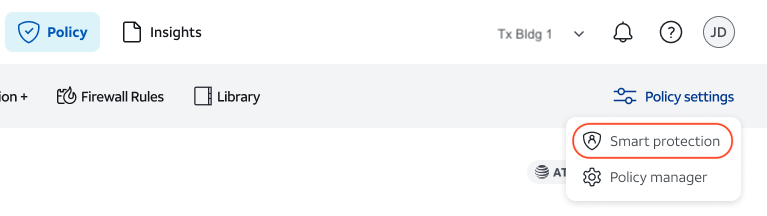
To initiate Smart Protection after you have created an initial policy, navigate to the Policy module at the top of the page. Click on Policy settings at the right-hand of the screen, then select Smart protection.