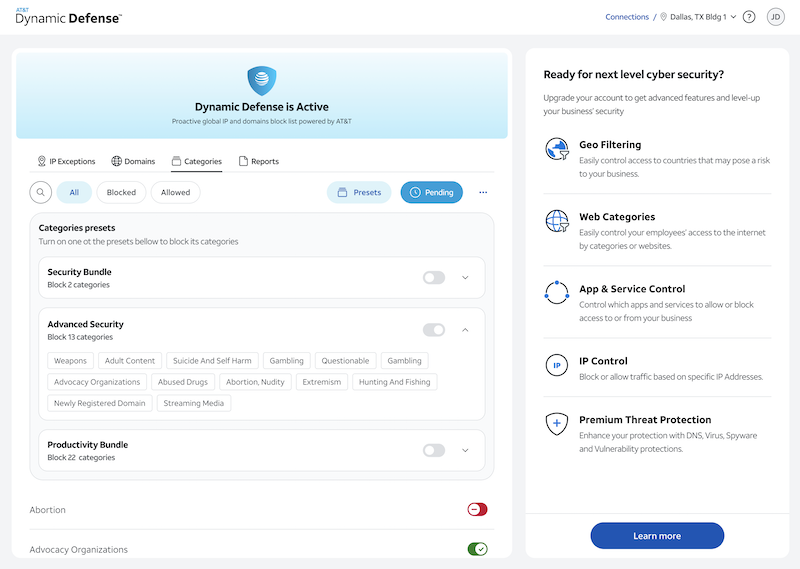
How to Set a Policy on Standard
If you have Standard Dynamic Defense on Business Fiber (ABF), then you will have the option to customize a policy using general categories for domains and websites like high risk, malware, etc. We have predefined templates that can give you a start or be used as your policy.
Please note: If you have dedicated internet (ADI) or switched ethernet (ASEoD) you will no see this option. Also, if you have the Advanced or Premium package this section will not apply to you. See the how to section above.
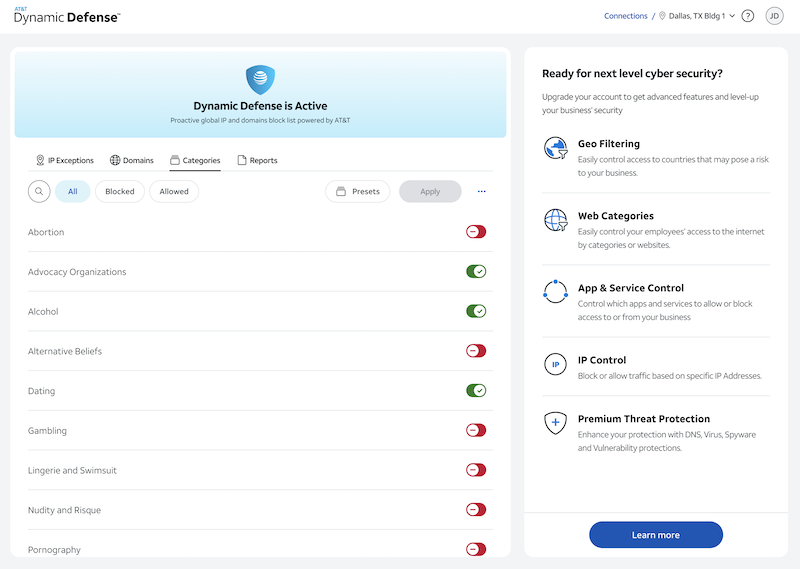
Individual Categories
To customize your policy, simply click the toggle next to the category you would like to block or allow. Red indicates that the category is blocked and green is allowed. Scroll through the list to see any category you wish to block. Once you have finished, click Apply.
Preset Templates
To choose a preset template, select Presets and choose from two predefine policies. The two policies are Advanced Security and Productivity Bundle. You can continue to customize your policy after selecting one of the presets if you wish. Once you have finished customizing, click Apply.