AI Defense
AI Defense helps you see which AI applications are running on your network and gives you further control of what is allowed. This feature acts as a filter across the Apps module under Policy and the App report under Insights. It shows the most common AI apps that employees may use to help their day to day work. AI Defense also allows you to filter the Web Categories module to only show related categories.
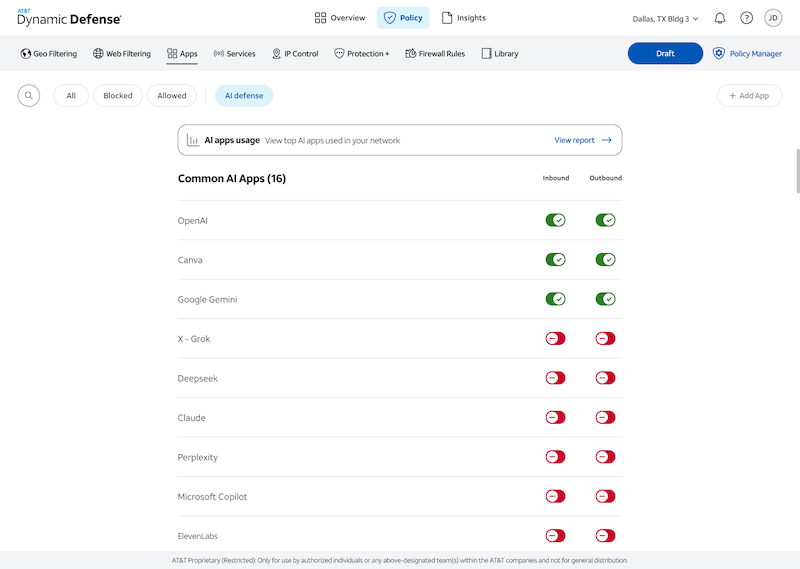
To block or allow any of these common AI application, go to Apps under Policy and select AI Defense at the top of the page. Once you see the common AI application, toggle the specific application you want. If the specific application you are looking for is not listed, select All at the top and then select Add App. Search for the specific application and add it to your list of managed apps
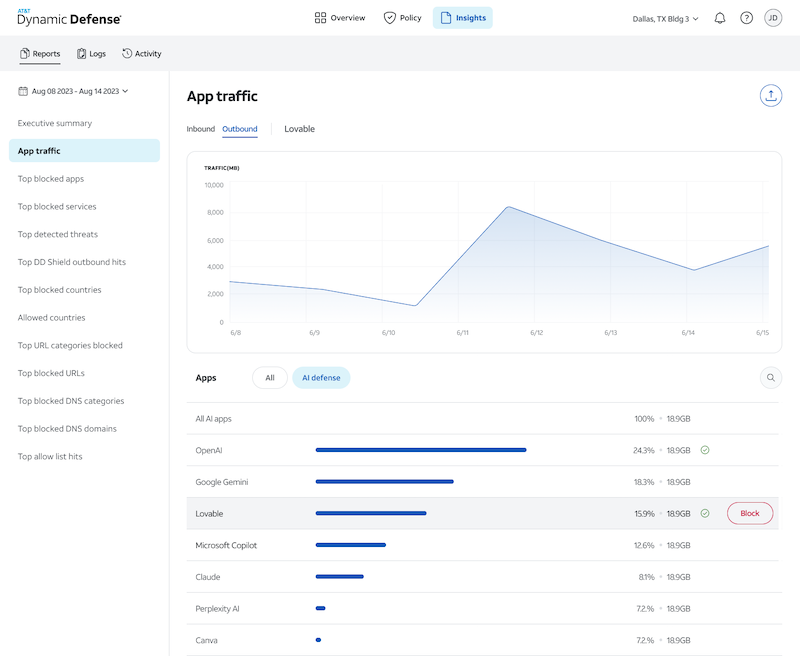
The App report will show which of these applications are being used on your network while specifying inbound and outbound directions. You can leverage this report to see what employees are using across your network and block any applications directly from the App report.
Summaries of this data will also be available in the executive summary report under Most Used Apps towards the bottom of the report. When looking at Most Used Apps, select the drop down at the top right in the graphic to filter by AI applications and see the top 5 inbound and outbound for your designated time period.
There are limitations to the AI Defense feature. For example, if an employee navigates to an allowed website and engages with an AI support tool that leverages OpenAI, AT&T Dynamic Defense will only record the traffic as the allowed website and will have no record of the AI support tool engagement.